
9.15.8 Exporting Tcl Scripts from within FlashPro®
To export a set of Tcl commands from the FlashPro® history:
- From the File menu, choose .
- Enter the filename and click
Save. The Script Export Options dialog is appears.
Figure 9-139. Script Export Options Dialog Box 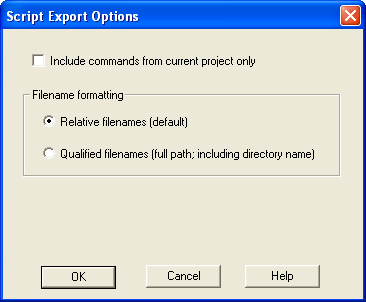
- Check the Include commands from current project only to export commands of the current project only. You can specify the filename formatting by selecting Relative filenames (relative to the current directory) or Qualified filenames(absolute path, including the directory name).
- Click OK.
- add_actel_device
-
Adds an Actel device to the chain. Either the file or device parameter must be specified. Chain programming mode must have been set.