21.8.1 Components of the SmartTime Timing Analyzer
Use the SmartTime Timing Analyzer to visualize and identify timing issues in your design for the selected scenario. In this view, you can evaluate how far you are from meeting your timing requirements, create custom sets to track, set timing exceptions to obtain timing closure, and cross-probe paths with other tools.
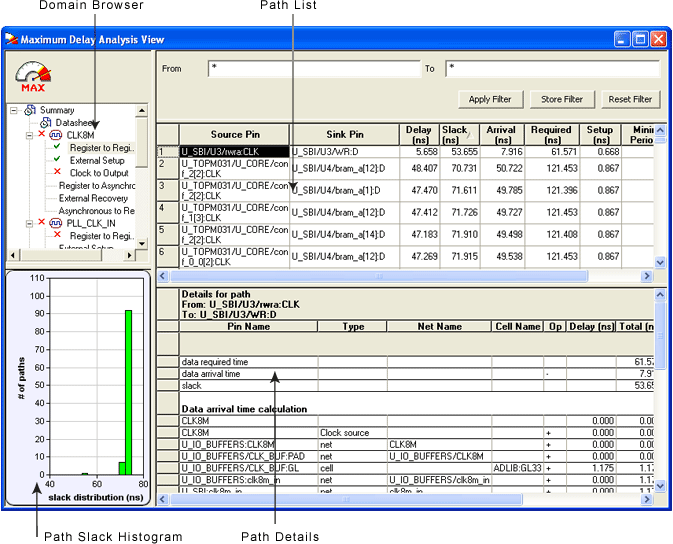
The timing analysis view includes:
- Domain Browser: Enables you to perform your timing analysis on a per domain basis.
- Path List: Displays paths in a specific set in a given domain sorted by slack.
- Path Details: Displays detailed timing analysis of a selected path in the paths list.
- Analysis View Filter: Enables you to filter the content of the paths list.
- Path Slack Histogram: When a set is selected in the Domain Browser, the Path Slack Histogram displays a distribution of the path slacks for that set. Selecting one or multiple bars in the Path Slack Histogram filters the paths displayed in the Path List.