
2.1.7 ASB Advanced Options
The Advanced Options in the Analog System Builder (ASB) enable you to set the external reference voltage and generate custom system configurations. Some custom configurations, such as ADC only or IP cores for ADC sequence control only, disable portions of the full Analog System functionality.
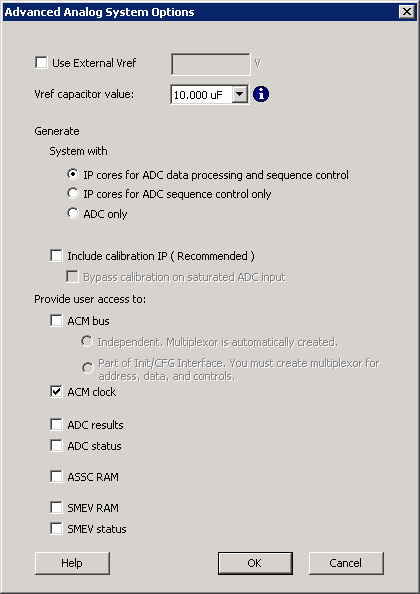
External Reference Voltage (VREF)
Configuring an external reference voltage enables the use of a specific analog‑to‑digital converter (ADC) reference voltage, which can improve conversion accuracy. The external reference voltage is applied through the Vref pin, where Vref = Vref.
This value specifies the reference voltage driven into the Vref interface of the analog block. If no external value is entered, ASB uses an internal reference voltage of 2.56 V. Using an external reference voltage affects threshold calculations for current and voltage peripherals.
Changing the external Vref may alter the legal threshold ranges for current and voltage monitors.
As a result, it is possible to configure current or voltage peripherals with threshold flags and later change the external Vref, which can invalidate existing threshold values. If threshold values become invalid due to a Vref change, the ASB main window displays an icon indicating configuration errors for the affected peripherals.
Vref Capacitor Value
The Vref Capacitor Value option lists supported external capacitor values that can be used when generating Vref internally. Select a value that is equal to or greater than the capacitor value used on the board.
The selected capacitor value determines the delay inserted before the analog block can begin sampling. This delay is automatically implemented by the Analog System Builder as a counter circuit.
To support faster simulations, a special capacitor value of 0.00 µF is available. This option should be used only for simulation, as actual devices require appropriate capacitor values to ensure accurate sampling.
Calibration Options
Enabling calibration modifies the internal analog system connectivity and generates additional output files. For more information about calibration behavior and generated files, see the ASB - Calibration options section.
Custom Analog System Configurations
The ASB Advanced Options dialog box allows you to generate the following analog system configurations:
- IP cores for ADC data processing and sequence control.
- IP cores for ADC sequence control only.
- ADC only.