
5.34.132 Project Manager - Cores Dialog Box (Advanced Download Mode
This dialog box (shown below) enables you to download cores from a web repository into a Vault.
A Vault is a local directory (either local to your machine or on the local network) that contains cores downloaded from one or more repositories. A repository is a location on the web that contains cores that can be included in your design.
The Catalog displays all the cores in your Vault.
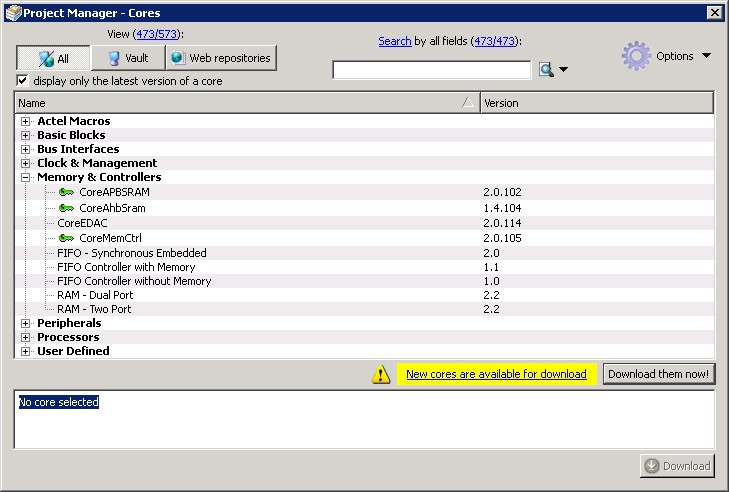
Figure 118 · Project Manager - Cores Dialog Box
Display only the latest version of a core is checked by default. This option, if checked, shows the latest versions of cores that are not in the Vault , and also filters out any duplicate cores that have the same Vendor, Library, and Name, with an earlier version number.
If the checkbox is de-selected the dialog box displays all cores, including those already loaded into the Vault. The status column indicates if a core has already been loaded.
Use the Filter to find any string that exists either in the core name or the Core Description. By default the filter contains a beginning and ending ‘*’, so if you type ‘controller’ you get all cores with controller in the core name (case insensitive search) or in the core description.
The colored icons indicate the license status. Blank means that the core is not license protected in any way. Colored icons means that the core is license protected, with the following meanings:
Green Key - Fully licensed; supports the entire design flow.
Y ellow Key - Has a limited or evaluation license only. Precompiled simulation libraries are provided, enabling the core to be instantiated and simulated within the Microchip Libero Integrated Design Environment (IDE). Using the Evaluation version of the core it is possible to create and simulate the complete design in which the core is being included. The design is not synthesizable (RTL code is not provided). No license feature in the license.dat file is
needed to run the core in evaluation mode. You can purchase a license to generate an obfuscated or RTL netlist.
Yellow Key with Red Circle - License is protected; you are not licensed to use this core.
Stop Downloads - Interrupts the download for any cores being added to your Vault.