
13.33.235 Script Export Options Dialog Box
If you export a Tcl script in the Project Manager, the Script Export Options dialog box appears.
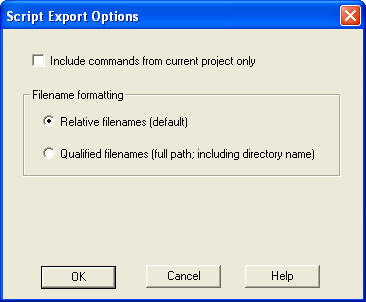
Include commands from current project only - Select this option if you want to include all the commands from your current project.
Filename Formatting - Choose Relative filenames if you do not intend to move the Tcl script from the saved location, or Qualified filenames if you plan to move the Tcl script on your machine.
| Command | Sub-menu | Icon | Function |
|---|---|---|---|
|
New Project | — |
|
Starts the New Project Wizard |
|
Open Project | — |
|
Opens the Open Project dialog box |
|
Close Project | — | — |
Closes the current active project; the Project Manager remains open |
|
Save Project | — |
|
Saves the current project |
|
Save Project As | — | — |
Saves the current project in a new directory; prompts you to enter a new project name |
|
Detect New | — | — |
Detects new files and adds them to the Project |
|
Files | — | — |
Manager (if found). |
|
VHDL Library > |
Add | — |
Add a VHDL library in your project |
|
Remove | — |
Remove a VHDL library in your project | |
|
Rename | — |
Rename a VHDL library in your project | |
|
Settings | — | — |
Opens the Project Settings dialog box; enables you to manage device, simulation, and programming options for your project |
|
Profile | — | — |
Opens the Project Profile dialog box; enables you to specify locations for your third-party synthesis, stimulus, and simulation tools. Libero IDE includes tools for synthesis, stimulus, and simulation. |
|
Configure Project Flow | — | — |
Opens the Configure Flow dialog box, sets options on your HDL netlists, DRC checker, ViewDraw, and a resource report when you generate a core. |
|
File Organization > |
Source Files for Synthesis | — |
Opens the Organize Source Files for Synthesis dialog box |
|
Source Files for Simulation | — |
Opens the Organize Source Files for Simulation dialog box | |
|
Designer Constraint Files | — |
Opens the Organize Constraints for Designer dialog box; enables you to organize your Designer constraint files in the Project Manager | |
|
Designer CDB Files | — |
Opens the CDB File Organization dialog box; the CDB File Organization dialog box manages conflict resolution (if any) between the blocks in your design | |
|
Stimulus | — |
Opens the Organize Stimulus dialog box; enables you to organize your stimulus files in the Project Manager | |
|
Designer Views > |
Select | — |
Choose your Designer View from the drop down menu. Note that views are listed in they order they were created |
|
Previous |
|
Switches to the previous view | |
|
Next |
|
Switches to the next view | |
|
Add |
|
Opens the Add Designer View dialog box; enables you to specify the name of your latest view | |
|
Remove |
|
Opens Remove Designer View dialog box; enables you to delete all related Designer View files from your disk | |
|
Rename |
|
Opens Rename Designer View dialog box; select the Designer View you want to rename and enter the new name | |
|
Execute Script | — | — |
Opens Execute Script dialog box; enables you to run Tcl script from the Project Manager |
|
Preferences | — | — |
Opens the Preferences dialog box |
|
Recent Projects | — | — |
Opens list of recent Libero IDE projects. |
|
Exit | — | — |
Closes Project Manager |


Command | Sub-menu | Icon | Function |